菜鸟C4D网站13岁啦 | 2013-2026

热门下载: 免费教程 建模插件 Octane教程 HDR贴图 汉化插件

C4D插件

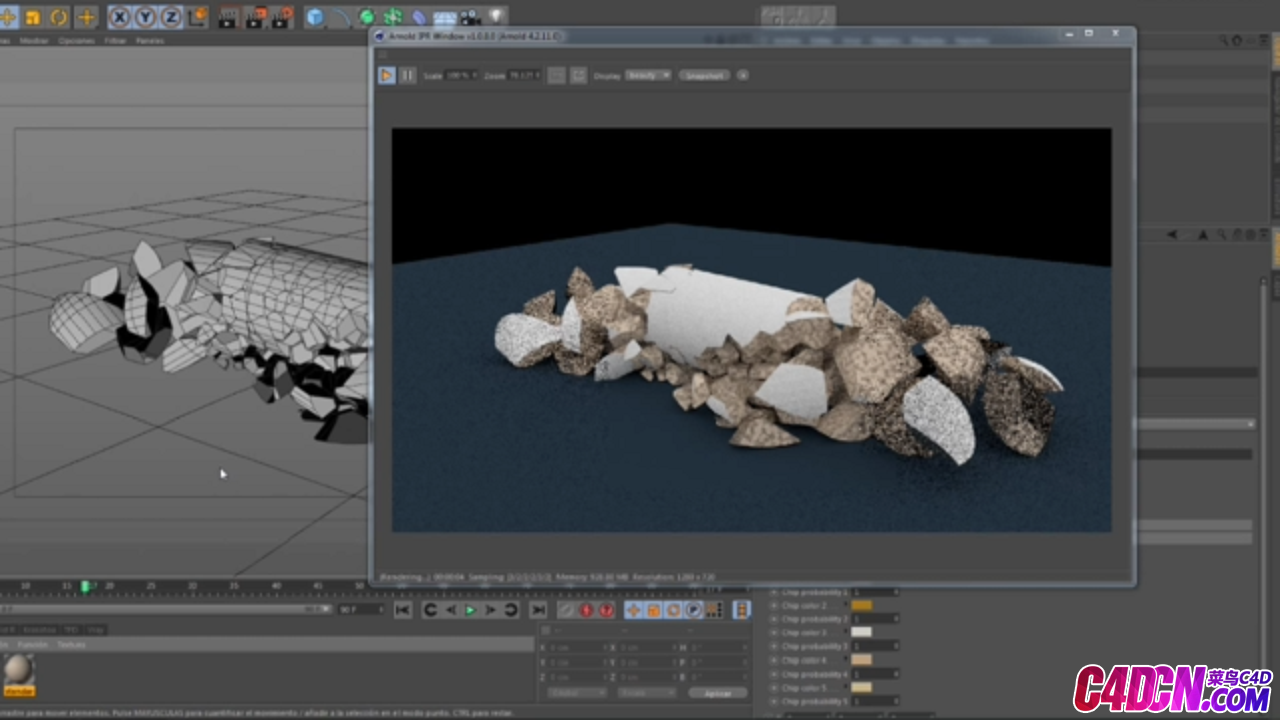
Houdini fracture asset v0.6 - for C4D - 菜鸟C4D

群专属免费素材
Houdini fracture asset v0.6 - for C4D
 热度: 114 [ 复制链接 ]
首页 › 分类资源 › C4D插件 发布时间:2018-7-7 23:07 @11年菜鸟C4D自学网站,专业 | 专注 | 全面
9641
123


190575b40d6ec763ab.png
Note : If you don't have dropbox login just click view only and download the plugin also i don't no where to paste this plugin if you found that please share in this thread it will be helpful but here is the instruction from Maxon to install the plugin :

CINEMA 4D HOUDINI ENGINE INTEGRATION – PUBLIC BETA

Plug-in Build: 136548

Compatible Houdini version: 14.0.367 ? Compatible Cinema 4D version: 16.050 (Cinema 4D R16 SP3)

To install the Houdini Engine plug-in for Cinema 4D, please follow these steps:

1. Exit Cinema 4D

2. Copy the files from this archive’s “modules” folder to the “modules” folder

of your Cinema 4D installation

3. Overwrite the “resource\modules\houdiniconfig” folder of your Cinema 4D installation with the

“resources\modules\houdiniconfig” folder from this archive

4. Overwrite the “resource\modules\houdiniengine” folder of your Cinema 4D installation with the

“resources\modules\houdiniengine” folder from this archive

5. Launch Cinema 4D

6. If the plug-in was installed successfully, you will see a “Houdini Engine” entry under the “Pipeline”

menu. If it only contains the “Get Houdini Installer...” command, it means that the Houdini

installation required by the plug-in was not found.

Use this command to download and install Houdini Engine for your computer, then restart Cinema

4D. The “Houdini Engine” menu should now contain all the Houdini plugin commands.

To activate your 30 days Houdini Engine trial after downloading the Houdini Engine, please follow

these steps:

Windows:

1. Go to the Start Menu

2. Select All Programs

3. Navigate to Side Effects Software > Houdini 14.0.367 > Utilities

4. Select Command Line Tools

5. Type: hkey -n 9 and press Enter

6. Follow the rest of the instructions

OR:

1. Open the terminal

2. Run:

"C:\Program Files\Side Effects Software\Houdini 14.0.367\bin\hkey.exe" -n 9

MAXON Computer GmbH – Max-Planck-Str. 20 – D-61381 Friedrichsdorf – +49 (0)6172 5906 0

Mac:

1. In the Finder top menu click on Go > Applications

2. Go to Houdini 14.0.367 > Utilities

3. Double click on Houdini Terminal

4. Type: hkey -n 9 and press Enter

5. Follow the rest of the instructions

OR

1. Open the terminal

2. Run: open /Applications/Houdini\ 14.0.367/Administrative\ Tools/License\

Administrator.app --args -n 9

Have a Great Day!


您或许还对以下C4D内容感兴趣
上一篇:C4D插件 展UV贴图编辑工具盒子插件汉化版 Coffeestock UVToolbox v1.9 R19
下一篇:C4D插件 样条绘制模型建模插件汉化版 Nitro4D NitroModel v1.0.1 R13-R19
avatar
您需要登录后才可以回帖 立即登录 QQ登录
首页 › 分类资源 › C4D插件 @11年菜鸟C4D自学网站,专业 | 专注 | 全面

菜鸟C4D,与你一起从零开始...C4DCN.com

2018-7-8 14:46
首页 › 分类资源 › C4D插件 @11年菜鸟C4D自学网站,专业 | 专注 | 全面

菜鸟C4D,与你一起从零开始...C4DCN.com

2018-7-8 22:32
首页 › 分类资源 › C4D插件 @11年菜鸟C4D自学网站,专业 | 专注 | 全面

将此回复同步到 腾讯微博 | 回帖后跳转到最后一页

2018-7-9 08:43
首页 › 分类资源 › C4D插件 @11年菜鸟C4D自学网站,专业 | 专注 | 全面

菜鸟C4D,与你一起从零开始...C4DCN.com

2018-7-9 09:58
首页 › 分类资源 › C4D插件 @11年菜鸟C4D自学网站,专业 | 专注 | 全面

广告是个什么鬼,还自动播放呀?

2018-7-9 16:14
首页 › 分类资源 › C4D插件 @11年菜鸟C4D自学网站,专业 | 专注 | 全面

而他个人塔尔特热话题然后身体会让他

2018-7-10 12:51
首页 › 分类资源 › C4D插件 @11年菜鸟C4D自学网站,专业 | 专注 | 全面

感谢分享!!!!!!!!!!!!!!!~~~~~~

2018-7-10 22:18
首页 › 分类资源 › C4D插件 @11年菜鸟C4D自学网站,专业 | 专注 | 全面

sujvsujvsujvsujvsujvsujvsujvsujvsujv

2018-7-11 14:12
首页 › 分类资源 › C4D插件 @11年菜鸟C4D自学网站,专业 | 专注 | 全面

将此回复同步到 腾讯微博 | 回帖后跳转到最后一页

2018-7-11 15:25
关闭

精选更新推荐 上一条 /6 下一条